


 WARNING: This product can expose you to chemicals including nicotine, which is known to the State of California to cause cancer. For more information, go to www.P65Warnings.ca.gov


Have you been craving rich flavorful clouds even when on the go? Find yourself in situations perfect for mind melting cartridge hits while out, but without the power to achieve them? Do you simply just want more from your vape pen?
Well want no more - because the Wulf Mods Grid 510 Variable Voltage Battery is the exact cartridge solution you’ve been looking for all your portable session fun!

Designed with fiery portability at the forefront, we’ve squeezed an XL 650mAh battery into the Grid’s slight 2.5” body providing you with a wide range of 4 voltage settings (2.8, 3.2, 3.6, 4.0v) and 12s pre-heat function. This lets you enjoy the full spectrum of cartridge experiences, whether you're in the mood to chill with lower temperatures or want to take things all the way up with full voltage.
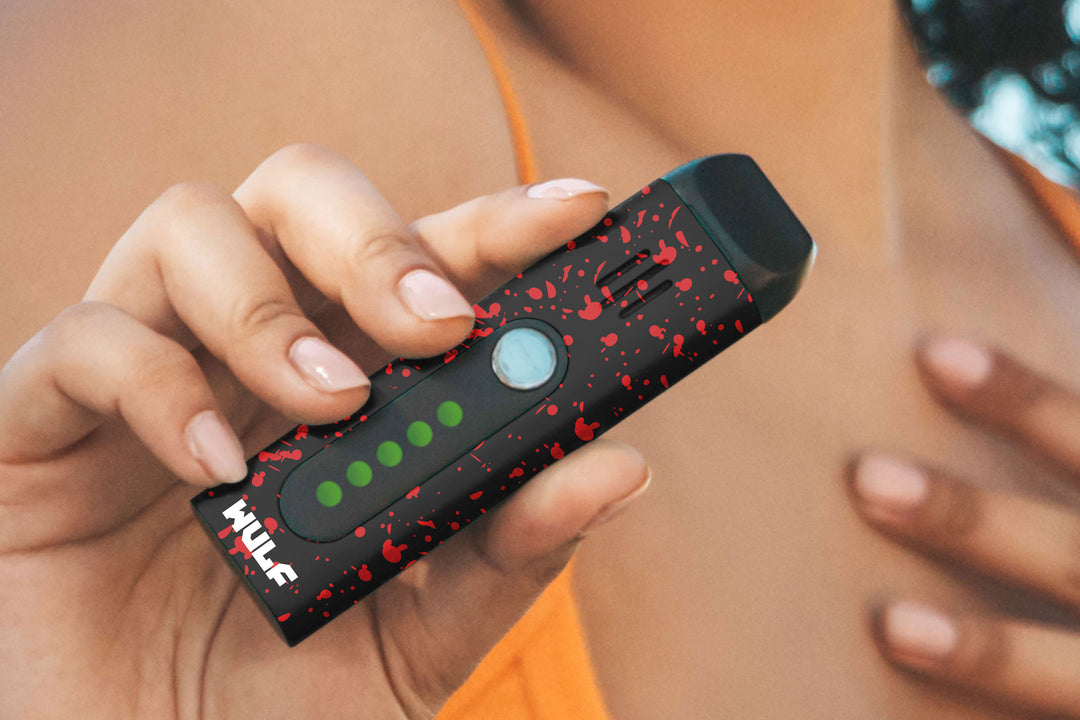
The Wulf Mods Grid features a large full color screen, packed with vital session information including color coded voltage levels, a dedicated puff counter, and your current battery level. This makes checking in on your settings easy, even when your on the go with your vaporizer.
Thanks to a dedicated key-ring-loop, the Wulf Mods Grid can be attached to your keys, backpack, or any other common item to guarantee you always have your trusty cartridge battery right by your side. This makes the Wulf Mods Grid Vaporizer the ultimate choice for portable clouds and the perfect addition to your collection!
Take a look at the 10 different colors including black-red spatter, full color, and more - to unlock your clouds and take your sessions off the grid, all with your own Wulf Mods Grid 510 Variable Voltage Battery.

Looking to hit the trail with your Wulf Mods Grid and begin your cloud adventures? First things first, you’ll need to choose one of your 510 threaded cartridges to get started with. Luckily for the Wulf Pack, the Grid is compatible with any and all sized cartridges - so the sky’s the limit and the destination for your cloud enjoyment!
With your 510 threaded cartridge in hand, simply gently twist your cartridge into the threaded connection until it has a nice snug feel. From here - you are all ready to proceed to the next step! Yes - it really is that easy to start ripping your Wulf Mods Grid!
Ready for some fiery cartridge goodness? Get started with your session by first turning your Wulf Mods Grid by pressing the square power button 5x in a row. This will cause your screen to boot up from bottom to top, indicating to you that you're ready to start enjoying your clouds.
To hit your Wulf Mods Grid, simply hold down the square power button and draw from the mouthpiece of your cartridge to commence enjoying all the delicious flavors and raw potency that sits within your cartridges! When done, simply release the power button and your Grid will cease heating your cartridge.
The Wulf Mods Grid can be used for up to 15s each draw, after which your device will flash a warning or blinker, to let you know you’ve reached time. To continue, simply release your power button and press it again to get back to the cloud fun.
When you and your friends have enjoyed all the clouds you can handle, simply press the power button an additional 5x in a row and your screen will slowly collapse downwards, letting you know your Wulf Mods Grid is all ready for travel or storage.

Get your cartridges ripping exactly how you want them by selecting between the 4 different voltage settings on your Wulf Mods Grid.
In order to adjust the voltage on your Wulf Mods Grid press the square power button 3x in a row, this will cycle you to the next voltage in line. To keep going, simply continue to press the power button 3x in a row for each level and enjoy easy access to all 4 of the included voltages.
For easy reference, each of the 4 available voltages has their own dedicated box and color, making identifying your setting completely seamless. The color coding on the settings include 2.8v - green, 3.2v- yellow, 3.6v - purple, and 4.0v - pink.
Want to add a bite more bite to your Wulf Mods Grid? Take advantage of the included 12s pre-heat function by pressing the square power 2x in a row. This will start a countdown wherein your cartridge is slowly heated to perfection, adding an immense amount of intensity to the following hit.
After the 12s countdown ends, take a hit as usual and get ready to blast off with a monumentally powerful cloud that stretches the power of the Wulf Mods Grid to the max. For all of the heavy duty cloud chasers out there, this is by far the most intense way to experience your Grid.
Looking to start fresh with the puff counter on your Wulf Mods Grid? All you have to do to reset the puff counter on the Wulf Mods Grid is to press the power button 8x in a row. This will bring it back to zero and let you start counting up again.
Be warned however, once your puff counter is reset your old count will be lost forever. So always make sure to double check before you go for the big refresh.

Keep the clouds rolling and your Wulf Pack satisfied by making use of the Wulf Mods Grid USB-C port. When you’ve successfully plugged in your Grid, the screen will turn on, your current % will display, and a green lightning bolt will begin to flash.
The first time you charge your Wulf Mods Grid make sure to leave it charging for a full two hours. Every time after the first, only ever leave the battery charging for an hour at a time. Anything over this can lead to degraded battery lifespan and other internal issues. Follow all warnings for optimal battery operation.


Heads up Wulf Pack, in order to get the most out of your Wulff Mods Grid there are a few troubleshooting warnings that you should be aware of.
For optimal cloud production and expanded battery lifespan, Wulf Mods recommend taking the time to periodically clean your Wulf Mods Grid. As an important note, when cleaning your device, always make sure to double check that the battery is off before proceeding.
To clean your Wulf Mods Grid power off the device, remove the cartridge, and make sure of a cloth to wipe off any residual dirt. For the 510 threaded connection, utilize a swab damped with isopropyl alcohol to rub off any oil build up and break away other tough to remove stains.
Once complete, always leave ample time for your Wulf Mods Grid to 100% dry before continuing to use it, as this can lead to serious battery issues like short circuits.

What’s Included:
WARNING: Do not charge with a powerbank of 5V or higher. Do not charge in your car. Do not overcharge. Failure to follow these instructions could result in battery damage and frying of the internal system.